
How to Write Instagram Captions That Actually Convert
A practical structure for Instagram captions that drives attention and action.
How to Write Instagram Captions That Actually Convert
You spent an hour on the perfect flat lay. The lighting is chef's kiss. But your caption? "New post 🙌 link in bio." — and crickets.
Here's the uncomfortable truth: on Instagram, the caption is the conversion engine. The photo stops the scroll, but the caption closes the deal — whether that deal is a click, a DM, a save, or a sale.
This guide breaks down exactly how to write captions that move people to act — with real formulas, examples by post type, and a smarter way to generate them at scale using GenCaptions.com.
Why Most Instagram Captions Fail
Most creators treat captions as an afterthought — a quick line dashed off before hitting publish. But Instagram's algorithm rewards saves and shares above almost every other engagement metric. And saves happen when captions deliver real value, spark emotion, or teach something useful.
The three most common caption mistakes:
- No hook. The first line is forgettable, so nobody taps "more" — and your caption is functionally invisible.
- No direction. You describe the photo instead of guiding the reader toward a feeling or an action.
- No CTA. You end with a hashtag dump instead of asking the one question that triggers a comment.
The Anatomy of a High-Converting Caption
Every caption that performs well shares the same structure — regardless of niche, tone, or post type:
Hook → Body → CTA
The first line wins the tap. The body earns the trust. The CTA harvests the action.
1. The Hook (Line 1 — make or break)
Instagram shows roughly 125 characters before "more." Your first sentence must compel the tap. Proven hook formats:
- Contrarian opener: "You don't need 10K followers to make your first sale."
- Bold claim: "This one caption tweak doubled my reach in 7 days."
- Relatable frustration: "Posting every day and still not growing? Read this."
- Question: "What's the real reason people unfollow accounts?"
2. The Body (deliver the promise)
After the hook earns the tap, your body must deliver. Keep it tight. Use line breaks generously — Instagram isn't Medium. Short paragraphs of 1–3 lines feel conversational and are far easier to read on mobile.
Write like you talk. Use "you" more than "I." Make the reader the hero, not yourself.
3. The CTA (close clearly)
Every caption needs exactly one clear ask. Not three. One. CTAs that convert:
- "Save this for your next post day." — triggers saves, boosts reach
- "Drop a 🔥 if this hit different." — low-friction comment trigger
- "Link in bio to try it free." — drives traffic
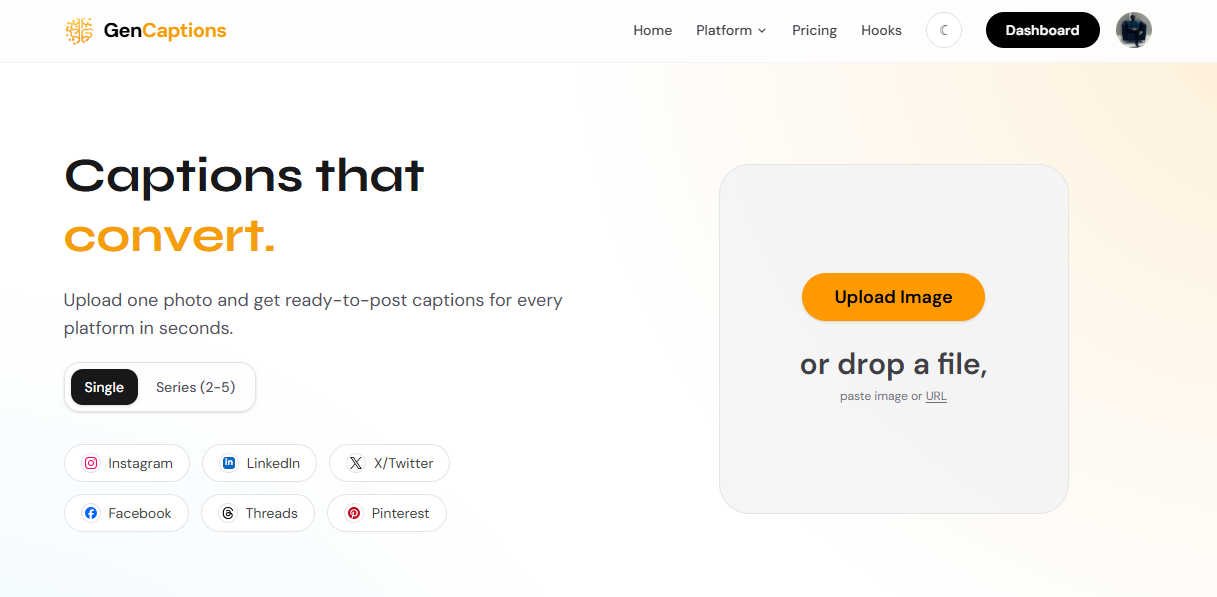
Step 1 — Describe Your Post on GenCaptions
Before writing a single word manually, let GenCaptions.com handle your first draft. Enter a short description of your photo or video, tell it your goal — engagement, traffic, or conversions — and it does the rest. No writing experience needed.
Caption Types by Post Format
Different post goals require different caption personalities. Here's the playbook:
- 📣 Product / Promo Post: Lead with the transformation, not the feature. Sell the result, not the thing.
- 📚 Educational / Carousel: Open with the pain, deliver the insight, end with "Save this." High save-rate = algorithmic gold.
- 🙋 Personal / Story Post: Vulnerability wins. Be specific. Generic "grateful" captions are invisible — specific moments are magnetic.
- 🔁 Reels / Video: Short and punchy. The video carries the weight — use the caption to add context or the CTA only.
- 🤝 Collab / UGC: Tag naturally. Tell the "why us" story. Audiences can smell forced sponsorships — authenticity converts.
- 💬 Engagement Post: Ask divisive (but safe) questions. "Hot take or real talk?" outperforms "What do you think?" every time.
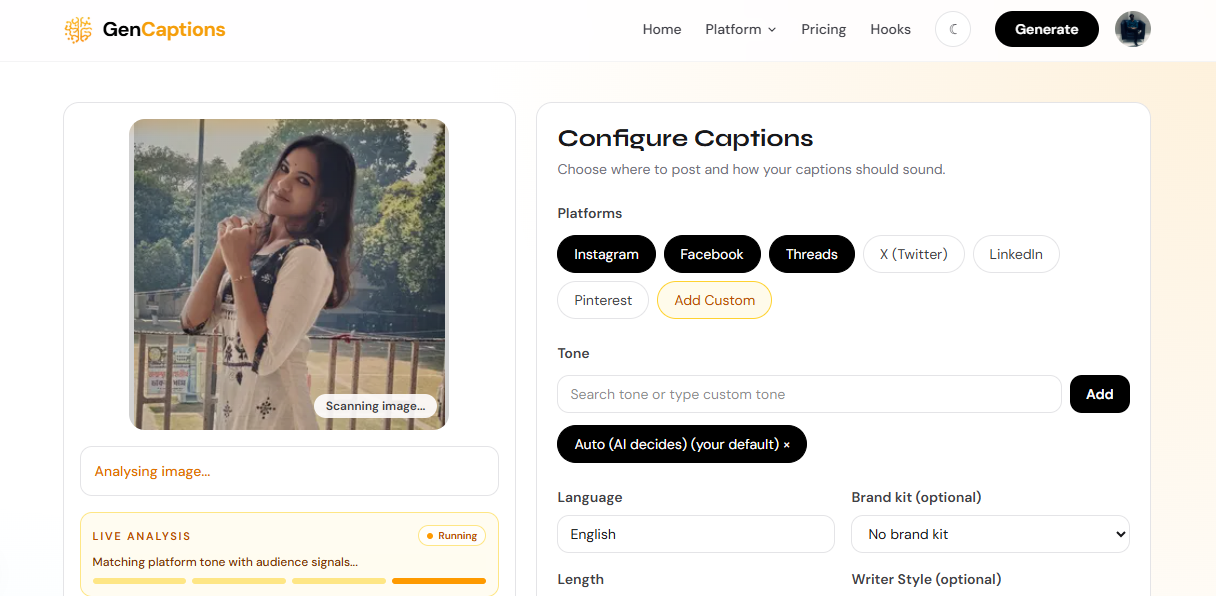
Step 2 — Choose Your Caption Type & Tone
Once you've described your post on GenCaptions, select the caption category that matches your goal — promotional, educational, storytelling, or engagement. Then dial in your brand voice: witty, professional, warm, or bold. This ensures the output sounds like you, not a generic AI bot.
How Long Should Your Caption Be?
Match caption length to content depth:
- Short (1–3 lines): Reels, aesthetic posts, quotes
- Medium (4–8 lines): Product reveals, announcements
- Long (8–20 lines): Educational carousels, storytelling posts
Always use line breaks every 2–3 sentences. Front-load value above the fold. Never start with "Good morning!" or lead with hashtags.
Match Your Tone to Your Audience
A luxury skincare brand and a gym supplement brand can both post "before and after" content — but their captions should sound completely different. Tone is what makes your account feel like someone, not something.
Luxury brand:
"Some mornings deserve more than a routine. This is one of them. ✨ Three drops. That's all it takes."
Fitness / gym brand:
"No more excuses. No more 'I'll start Monday.' THIS is week one. Tag someone who needs to see this 💪"
Hashtags & Emoji: The Right Way
Hashtags
Put hashtags after your CTA, separated by line breaks, or in the first comment. Use 5–15 highly relevant tags rather than spamming 30 generic ones. Mix sizes: 1–2 large (#fitness), 3–5 medium (#homegymlife), and 3–5 niche (#minimalfitnessgear).
Emoji
Emoji used strategically increase engagement — but only when they add rhythm or replace words. Use them to break up text, add emotional colour at the end of a punchline, or signal urgency. Avoid a parade of random emoji after every sentence — it reads as spam.
5 Advanced Caption Tactics Most Creators Ignore
- The cliffhanger first line. End your hook mid-thought — "I almost quit Instagram last month. Here's what changed..." — to guarantee the tap.
- Social proof baked in. "Over 3,000 people saved this post last week" is a CTA and a trust signal in one line.
- The "this is for you if…" qualifier. Narrow your audience in the caption to increase relevance — and relevance drives saves.
- Pattern interrupt mid-caption. An unexpected shift in tone or a bold one-liner mid-post reboots attention when it wanders.
- Repurpose top-performing captions. If a structure worked once, it will work again with a different hook. Track what converts and model it.
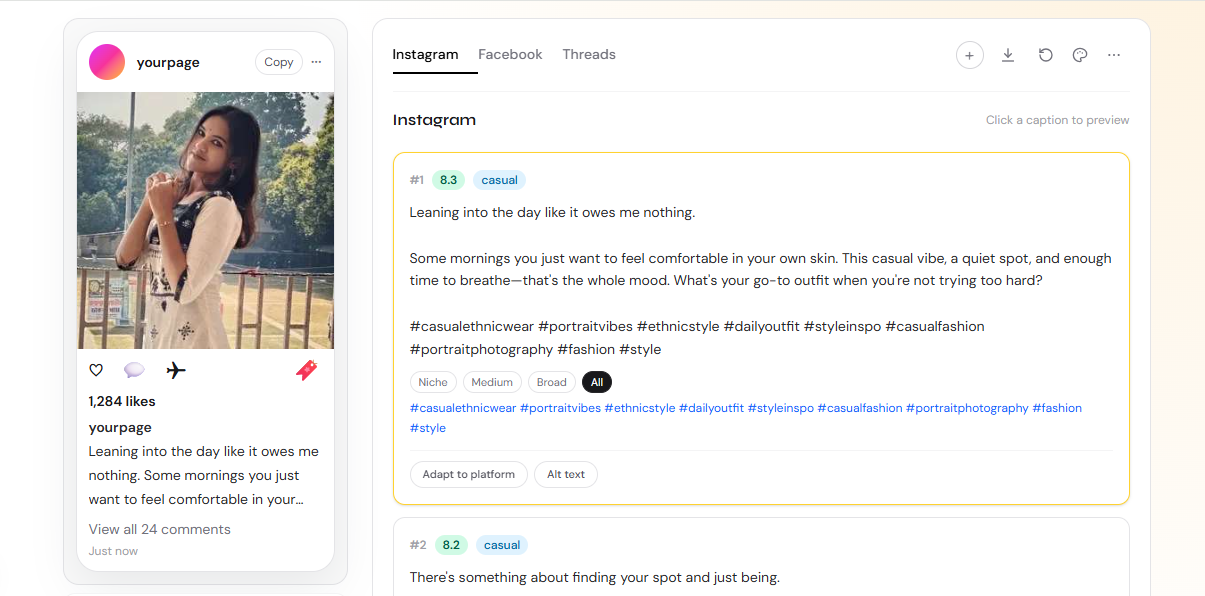
Step 3 — Copy in One Tap or Regenerate Instantly
Your captions are ready to paste directly into Instagram. Not vibing with the first result? Hit regenerate for a fresh variation — no rewriting, no staring at a blank screen. GenCaptions.com gives you multiple options so you always have the right caption for the right post.
Ready to Write Captions That Actually Convert?
The formula is simple: a strong hook, a body that delivers value, and one clear CTA. Match your tone to your audience, keep it readable on mobile, and use hashtags strategically.
When you need a first draft fast — or just want to stop staring at a blank caption box — GenCaptions.com generates scroll-stopping Instagram captions tailored to your niche, tone, and post goal in under 10 seconds. Try it free today.
About this article
This guide is part of the GenCaptions editorial library focused on better hooks, stronger positioning, and faster caption workflows for modern social teams.